
Make your signature transparent, instantly
Got a signature on paper? Upload a photo of it and the background disappears. Use the threshold slider to fine-tune for paper color, lighting, and ink darkness. The output is a transparent PNG ready for any PDF, Word document, or email signature. The image is processed entirely in your browser and never sent to a server.
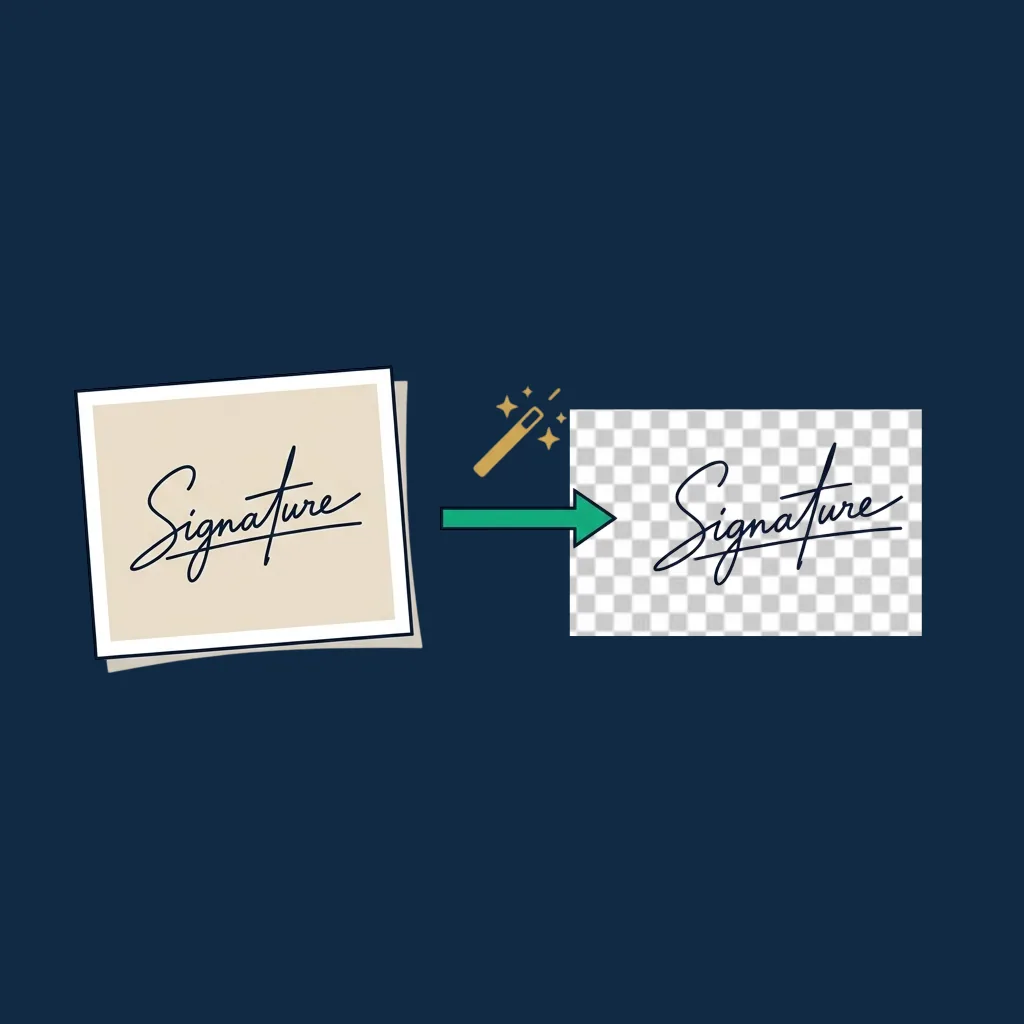
Slide right to remove more background. Slide left if your ink is being erased.
Original
Transparent (preview on checkered bg)
Step-by-step guide
- 1
Upload your signature image
Drop a photo or scan (PNG, JPG, HEIC). Best results from a flat, well-lit shot of dark ink on white paper.
- 2
Adjust the threshold
Slide right to remove more background. Slide left if your ink is being erased. The preview updates in real time over a checkered transparency pattern.
- 3
Compare side-by-side
The original image and the transparent result sit next to each other so you can see exactly what is being kept and what is being removed.
- 4
Download the transparent PNG
The exported file has a fully transparent background, so it drops into any document, email signature, or template without a white box around it.
Why use this tool
Threshold-based, not destructive
The original is never modified. Adjust the threshold as many times as you like before exporting.
Anti-halo edge softening
Pixels near the threshold get partial transparency to reduce the ugly halo around drawn strokes.
Runs locally: image not uploaded
The image is processed in your browser, on your device. We do not have a backend that receives anything.
Free and instant
No account, no email gate, no daily limit, no watermark. Process as many signatures as you need.
Transparent PNG ready to use
Output is a true alpha-channel PNG that drops cleanly into PDFs, Word docs, Google Docs, email signatures, and templates.
Works on phone and tablet
Upload directly from your camera roll. Adjust the threshold with your finger on the slider.
Common use cases
Add a real handwritten signature to a PDF
Sign on paper, photograph it, remove the background, drop the transparent PNG onto any PDF using our PDF signer or your favorite PDF editor.
Email signature with handwriting
A real handwritten signature in your email footer feels more personal than a typed name. One-time setup, every email feels signed.
Word and Google Docs templates
Insert a transparent signature into letterhead templates so all outgoing letters appear pre-signed.
Branding and marketing assets
Founders' signatures on About pages, certificates, thank-you cards, contracts. Keeps the human touch on otherwise digital documents.
Convert old paper contracts to digital
When migrating archives, pulling clean signatures off scanned originals lets you create a digital signature library for re-use.
Pair with the Signature Generator
Compare your real handwritten signature with the typed/drawn version from our generator and pick the one that looks better.
Why use this tool instead of Photoshop or an AI service
Removing a signature's background is a simple computer vision problem: every pixel above a certain brightness is "paper", everything below is "ink". This tool implements that thresholding directly in your browser. The result is fast, free, and private.
Compared to Photoshop or GIMP: those tools can do the same thing with the Magic Wand or color-range selection, but require installing software, learning the interface, and processing one image at a time anyway. Our tool is a single web page.
Compared to AI background remover services (Remove.bg, etc.): AI services excel at complex scenes (people against backgrounds, objects with hair, transparency in glass). For a signature on paper, AI is overkill: the threshold approach gives equivalent results in milliseconds, without uploading your signature to a third-party server. Some of those services also charge per image after a free quota.
This tool is purpose-built for signatures and only signatures. That focus is what makes it the right choice.
Honest limitations
- ! This is an image utility. It does not sign, send, witness, or otherwise process your signature as a legal act; it only edits a picture file.
- ! Best results require dark ink on light paper. A pencil signature on cream-colored paper produces a less clean separation.
- ! Photos with hard shadows from desk lamps will have parts of the shadow incorrectly flagged as ink. Re-photograph with even lighting if possible.
- ! Faded or very light pen strokes can register as background. Slide the threshold left until the lightest part of your signature stays visible.
- ! No batch processing: one image at a time. For larger batches, use a desktop tool with a recorded action.
- ! Works best with dark ink (blue, black, dark gray). Light pastel inks blend into paper and may not separate cleanly.
This is an image-editing utility. It does not provide legal advice and is not a signing service. The tool simply removes the background from a picture of a signature. Whether the resulting image is a valid signature for any specific purpose depends on the document, the parties, and the law that applies.
Tired of pasting signature images into every document?
Real eSignature platforms collect signatures directly from recipients with audit trails: no scanning, no image editing, no version-control headaches. See our top picks.
Compare eSignature platforms →Frequently asked questions
How does the background removal work?
Why does my ink get erased when I slide too far?
My signature has shadows from the photo. What now?
Does my image leave my device?
What's a good signature scan setup?
Can I batch-process multiple signatures?
Does the transparent PNG count as a valid signature on its own?
Can I use the output in DocuSign, Adobe Sign, or other platforms?
Related tools and articles
PDF Signer
Drop your now-transparent signature directly onto a PDF.
Open →
Signature Generator
Skip the scan entirely: type or draw a signature from scratch.
Open →
Guide: how to sign a PDF online
5 methods compared, including transparent-PNG-into-PDF workflows.
Open →
What is eSignature software?
When a signature image stops being enough.
Open →
Best free eSignature software
Honest comparison of permanent free tiers across the major platforms.
Open →
Sign.Plus vs DocuSign
Compare the most popular eSignature platforms.
Open →